Plan not perfect. Start anyway.
Turn your syllabus into a week that fits.
A calm planner for university students with ADHD. Upload a syllabus, approve what matters, and get a realistic plan plus a two-minute first step.
✓ Free during beta ✓ No credit card ✓ AI off by default
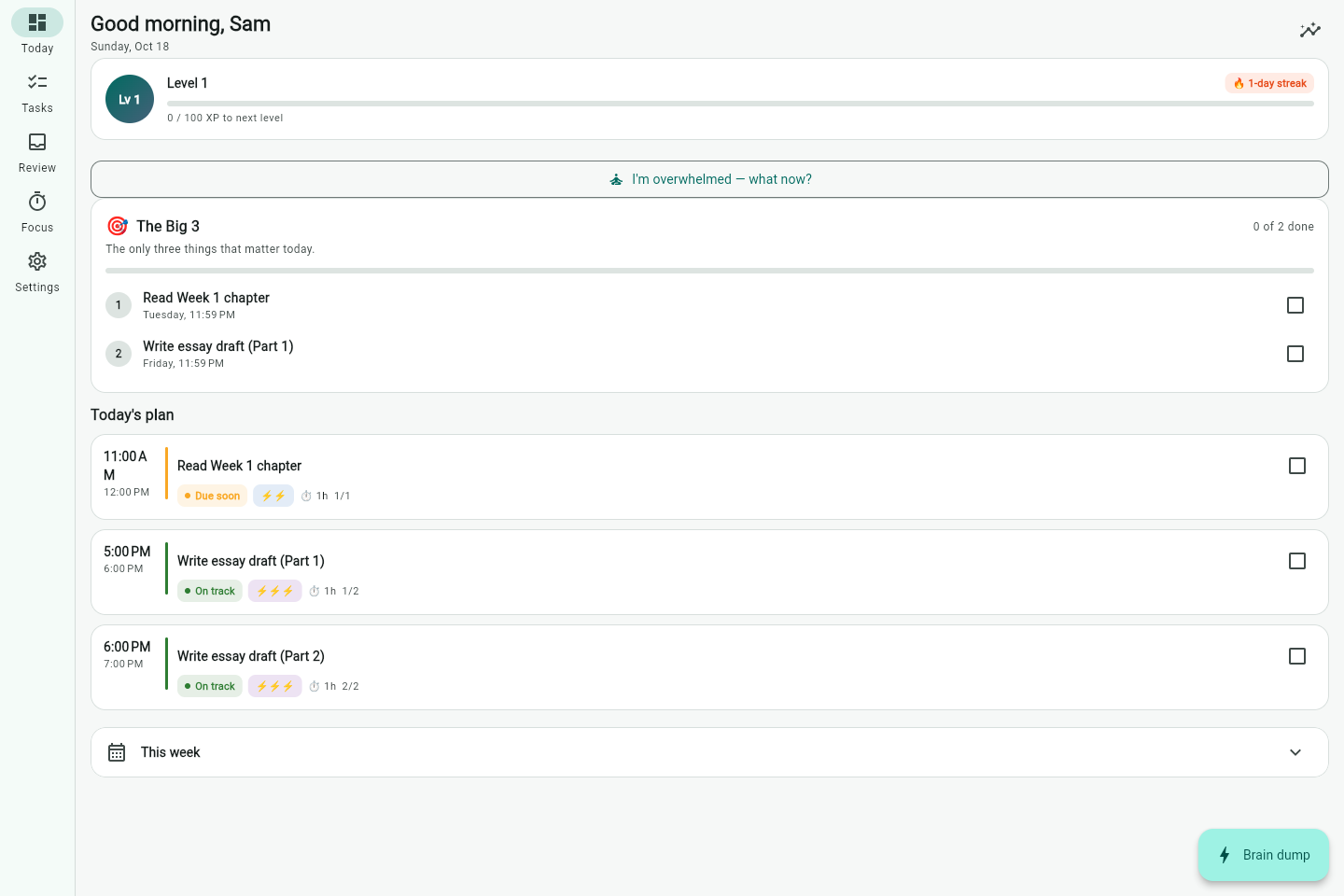
- ✓ AI drafts, you approve every task
- ✓ Export or delete your data anytime
- ✓ No ads. Your data is not sold
- ✓ No shame streaks or guilt
It is not laziness. The plan just never survives the week.
If any of this sounds familiar, the problem is the plan, not you.
I know what is due. I still cannot make myself start.
The deadline is in three days, and the gap between "I should" and doing it feels impossible to cross.
Everything feels equally urgent, so I do nothing.
Forty tasks, no order, and your brain shuts off before you pick one.
One bad day and I abandon the whole system.
The list guilt gets so heavy that opening the app hurts, so you stop opening it.
A plan that fits your real week. Then one small start.
The core loop takes about five minutes on your first day.
Your week, built from your syllabus
Upload a PDF or DOCX and the app extracts assignments and deadlines. You approve each one, so nothing enters your plan without you. It respects your classes, days off, chronotype and energy. Most planners assume eight free hours a day; this one uses the hours you actually have.
The first two minutes are the product
"Just start" turns a scary task into a 2 to 5 minute step you can do right now. Starting is the hard part, so the app makes starting the whole ask. No forty-item list, no perfect plan, just the next tiny move.
No shame when the week goes sideways
Reset my day clears the blocks that slipped without deleting anything. Focus sessions end with a one-line "where did I stop?" checkpoint, so re-entry costs seconds instead of twenty minutes. You fall off, you come back, the plan is still there.
Add one thing
Upload your syllabus or type a task. Thirty seconds, no setup marathon.
Approve the plan
AI extracts the deadlines, you keep what is real. About two minutes.
Do your Big 3
Only three things matter today, each with a tiny first step.
Focus and come back
Run a session, leave a checkpoint, get an optional email reminder.
Built for the phone in your pocket.
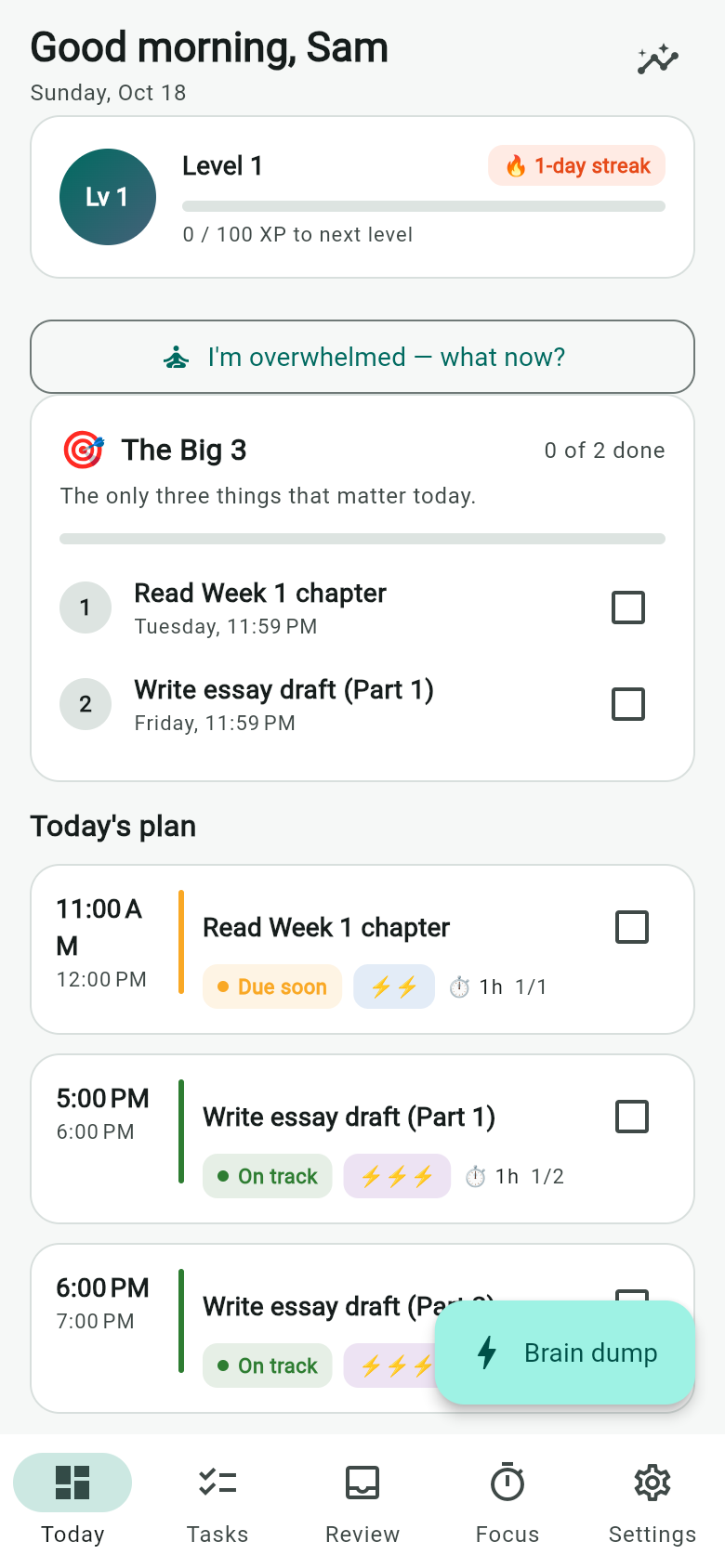
Install it from the browser, no app store required. Add a thought in seconds before it escapes.
- ✓ Brain dump: one field, no deadline, straight to your inbox
- ✓ I'm overwhelmed, what now? shows one task and one tiny step
- ✓ Optional email reminder so the plan reaches you when the app is closed
- ✓ Focus timer with "where did I stop?" checkpoints for fast re-entry
AI that asks first.
Uploading a syllabus means sending a real document somewhere. That is a real decision, so the app makes it yours: AI help is off until you turn it on, and the confirmation says exactly what will be sent.
- ✓ Off by default. Without consent, uploads and AI actions are blocked on the server, not just hidden in the UI.
- ✓ You approve every task. Extracted deadlines land in a review queue first, so a wrong date never silently enters your plan.
- ✓ Export anything, anytime. Download your tasks, uploads and history as JSON.
- ✓ Delete means delete. Removing your account removes your data, and resetting a password signs other devices out.
- ✓ No ads, no data selling. Reminder emails are opt-in and every one has a one-click unsubscribe.
Simple pricing
The beta is free while the product earns your trust.
Free while in beta
$0 for now
Upload syllabi, plan your week, run focus sessions and get reminders. No credit card, no trial countdown.
Later, about $4.99/month or $39/year, with a student discount. Core planning and reminders stay free.
Plan my first week freeQuestions students ask first
Short answers. If yours is missing, email us.
Is this medical advice or treatment?
No. Plan Not Perfect is a planning and focus tool, not therapy, diagnosis or medical care. Use it alongside whatever support you already have. If you are in crisis, contact local emergency services.
What happens to my syllabus if I use AI?
AI help is off by default. When you turn it on, the text of files you submit goes to Google Gemini to extract assignments. You can export everything as JSON or delete your account and data at any time. No ads, and your data is not sold.
Do I have to upload a syllabus?
No. Add tasks by hand if you prefer. AI is optional, and the planner, reminders and focus tools all work without it.
Will it work with my calendar?
Import an .ics calendar now, and export your plan to Google Calendar or Apple Calendar. Two-way sync is on the roadmap.
What happens if I miss a day or a week?
Use Reset my day to clear the slipped blocks without touching your tasks. There are no punishing streaks, and coming back after a gap is a designed flow, not a failure.
Your next semester starts calmer.
Start free, or leave your email and we will send you a gentle reminder when the beta opens up.
One email when it matters. Unsubscribe in one click. No credit card during beta.